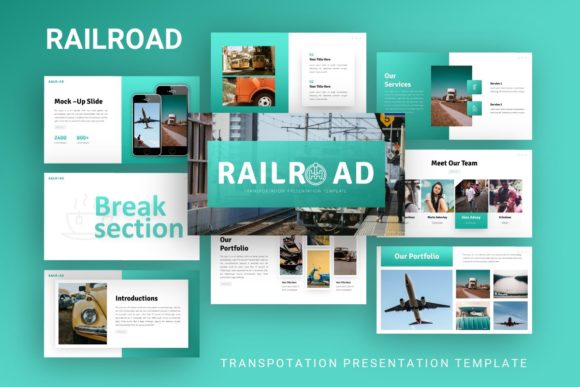
Evaluating Presentation Template - Railroad for Professional Use
Selecting the right visual framework is a critical step in preparing any professional deck. The Presentation Template - Railroad offers a specialized design system tailored specifically for the transportation and logistics sectors, though its utility extends to broader corporate applications. When evaluating this asset, it is necessary to look beyond the aesthetic theme and assess its functional capacity to support complex data, streamline workflow, and maintain brand consistency. This evaluation explores the technical specifications, practical applications, and strategic considerations necessary to determine if this template aligns with specific project requirements.
Defining the Asset and Core Specifications
The Presentation Template - Railroad is a comprehensive PowerPoint (.PPTX) resource designed to facilitate the creation of industry-specific presentations. Unlike generic business templates, this asset integrates thematic elements relevant to rail transport, infrastructure, and logistics while maintaining a clean, corporate structure. It includes 35 unique slides based on Master Slides, ensuring that global changes to fonts, colors, or logos propagate consistently throughout the deck without manual reformatting.
A significant component of this template is the inclusion of handcrafted infographics. These are not static images but fully editable vector elements within PowerPoint. This distinction is vital for users who need to update statistics, timelines, or process flows without returning to external graphic design software. The package also provides documentation files and vector icons, supporting a self-contained editing environment. Users should note that while the layout and graphics are included, preview images are for demonstration purposes only and must be replaced with original content.
Strategic Fit: Industry Relevance and Versatility
The primary value proposition of the Presentation Template - Railroad lies in its contextual relevance. For organizations operating within the railroad transportation sector, the visual language reduces cognitive load for the audience. Stakeholders familiar with the industry respond better to decks that reflect their operational reality through appropriate iconography, color palettes, and layout structures. This template serves as an immediate signal of industry competence.
However, the template’s versatility allows for application beyond strict railroad operations. The underlying grid systems and typography choices make it suitable for:
- Creative Agencies: Pitching branding or marketing services to logistics clients.
- Corporate Profiles: Annual reports or internal updates for transportation conglomerates.
- Startups and Pitch Decks: Mobility tech companies seeking investment where visual polish establishes credibility.
- Portfolios: Photographers or consultants specializing in industrial or infrastructure projects.
If the presentation topic intersects with heavy industry, supply chain management, or infrastructure development, this template provides a stronger foundational fit than a standard minimalist corporate theme. Conversely, for topics entirely unrelated to these fields (e.g., healthcare, software SaaS, or fashion), the thematic elements may create unnecessary friction, requiring excessive modification to neutralize the railroad aesthetic.
Functional Benefits and Workflow Efficiency
Beyond aesthetics, the decision to adopt this template often hinges on production efficiency. The reliance on Master Slides is a key technical benefit. In professional environments, time spent adjusting individual slide layouts is non-value-added work. By utilizing a master-based architecture, users can implement global brand updates instantly. This is particularly beneficial for teams where multiple stakeholders contribute to a single deck, as it enforces visual governance and prevents format drift.
The "pixel-perfect" and resizable nature of the illustrations addresses a common pain point in presentation design: scalability. Vector-based graphics ensure that visuals remain crisp regardless of screen size or projection resolution. Furthermore, the drag-and-drop picture placeholders streamline the content population phase. For users managing tight deadlines, these features reduce the technical barrier to producing high-quality visuals, allowing focus to remain on narrative and data accuracy.
Tradeoffs and Practical Considerations
While the Presentation Template - Railroad offers distinct advantages, potential users must weigh specific tradeoffs. The most immediate consideration is the learning curve associated with editable infographics. While marketed as easy to customize, manipulating complex vector shapes in PowerPoint requires a baseline level of proficiency. Users accustomed to simple text replacement may find themselves frustrated when attempting to adjust chart data or resize grouped graphical elements without breaking the alignment.
Another factor is the specificity of the design. Highly themed templates can sometimes constrain content. If a user’s data does not fit neatly into the pre-designed infographic styles, they may need to build custom slides from scratch. Mixing custom slides with highly stylized template slides can result in visual inconsistency. Therefore, this template is best suited for users whose content strategy aligns with the available 35-slide variety. If the presentation requires extensive unique data visualization types not present in the set, the time saved by using the template may be negated by the effort required to match the style manually.
Licensing and asset management also require attention. Since demo images are excluded, users must have access to high-quality, licensed photography that matches the template's tone. Using low-resolution or stylistically mismatched stock photos can undermine the professional finish of the pixel-perfect illustrations. The template provides the container, but the user remains responsible for the quality of the content placed within it.
Decision Framework: Is This Template Right for You?
To determine if the Presentation Template - Railroad is the correct investment, evaluate the project against the following criteria:
- Audience Alignment: Does the audience expect or appreciate industrial/logistics visual cues? If yes, the template adds value. If no, a neutral alternative is preferable.
- Technical Proficiency: Does the team possess intermediate-to-advanced PowerPoint skills? The editable vectors offer power but demand competence.
- Content Volume: Do you need approximately 35 slides of varied layouts? Over-buying slide count leads to unused assets; under-buying leads to design gaps.
- Brand Flexibility: Can your corporate identity coexist with the template’s default color scheme? While customizable, some templates have hard-coded accent colors that are tedious to change globally.
- Asset Readiness: Do you have replacement imagery ready? The template is a shell; without prepared content, the setup time increases significantly.
When to Consider Alternatives
There are specific scenarios where alternatives to the Presentation Template - Railroad may yield better outcomes. If the primary goal is rapid data reporting rather than visual storytelling, a dashboard-focused template with native Excel linking might be more efficient. Similarly, if the presentation is intended for a digital-first, interactive experience rather than a linear slide deck, web-based presentation tools may offer superior navigation and engagement features.
Additionally, organizations with extremely rigid brand guidelines may find that adapting a third-party themed template takes longer than building a custom master deck from a blank slate. If more than 40% of the template’s slides require significant structural alteration to meet compliance or branding standards, the efficiency argument diminishes. In such cases, the template serves better as inspiration for layout ideas rather than a direct production asset.
Final Evaluation Insights
The Presentation Template - Railroad represents a targeted solution for professionals in transportation, logistics, and related creative fields. Its strength lies in the intersection of industry-specific aesthetics and robust, master-slide-driven functionality. For users who match its intended profile, it offers a significant reduction in design time and an elevation in visual professionalism. However, successful implementation depends on realistic expectations regarding customization effort and content alignment. By objectively assessing technical capabilities and project needs against the template’s features, decision-makers can confidently select a tool that supports both their immediate presentation goals and long-term communication standards.